 |
|
|
|
| Ease of Operation |
|
| Reading the LCD Screen |
|
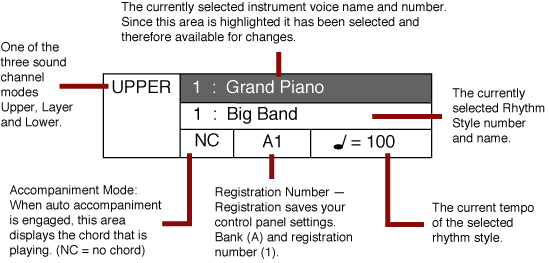
| The intuitive LCD opening display screen is described below. |
|
 |
|
| Using the LCD Controls |
|
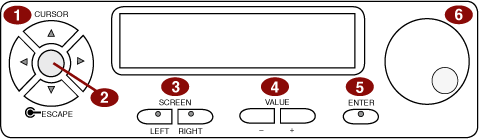
| The LCD display control buttons are described below. |
|
 |
|
- CURSOR BUTTONS – Use these buttons to select the portion of the screen that you wish to change.
- ESCAPE BUTTON (Red) – Located in the middle of the Cursor Buttons. When pressed it will return the current display screen to the previous screen. Continue pressing this button to return to the initial LCD Display screen.
- SCREEN BUTTONS – The Left and Right SCREEN buttons will move the display to additional pages within the selected menu. The LED Button indicator will be lit if there is additional screen information available.
- VALUE BUTTONS – Use these to adjust the value of the selected menu item.
- ENTER BUTTONS – Use to engage a highlighted selection.
- DATA WHEEL – Use as an alternative to the Value Buttons when you wish to access selections faster.
|
|
|
